

If you’ve ever opened the Shopify ‘Custom Data’ settings and stared at the word Metaobjects, wondering if you actually needed them, or if they were just Metafields with a fancier name, you aren’t alone.
For a long time, they felt like a riddle I couldn’t quite solve. To me, Metaobjects were an abstract tool that influencers kept saying were “powerful,” but the actual “why” remained fuzzy.
It wasn’t until I stepped away from the documentation and visualized a physical storefront that everything finally clicked.
Here is the simple analogy that changed how I see metaobjects and how I build Shopify stores.
What is a Metaobject in Shopify?
When I first started diving into Shopify’s advanced features, metaobjects felt like a bit of a riddle; they weren’t exactly intuitive, and it took me some time to truly wrap my head around how they differ from standard data or even metafields.
It wasn’t until I visualized a physical showroom, like the one in the image below, that the “aha!” moment finally happened.
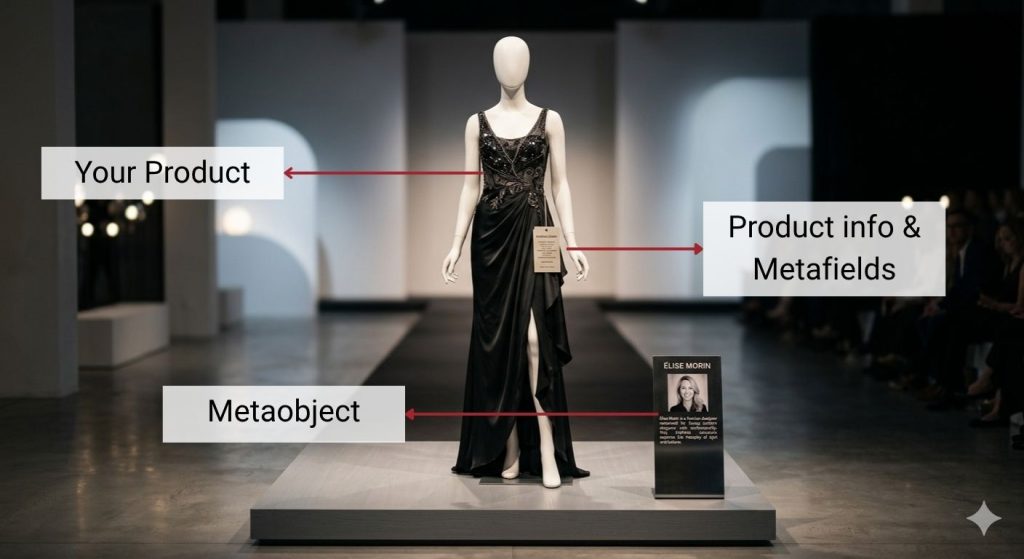
In this analogy, if your dress is the Product and the hanging tag contains your product info and Metafields (like size, price, or the fabric’s origin country), the Metaobject is that standalone designer plaque sitting on the floor next to it.
While the tag is physically tied to that one specific dress, the plaque is its own independent entity that contains a group of structured information: a photo, a biography, and a name.
Because it exists on its own, you can move that same “Designer” metaobject around your store, like to the entrance or to a dedicated room in which you honor the designers.
It’s essentially a reusable “content bucket” that allows you to store rich, complex information in one central place and then display it across any product or page that needs it.
What is the difference between a metafield and a metaobject?
A Metafield is usually just one piece of extra information you define for your product.
If we go back to our previous analogy, a metafield would just be a piece of custom information in the tag of the dress, for example:
- Fabric’s origin country.
- Washing instructions.
- Inspired by.
- Technique.
Basically, just extra info that you want to include outside of the basic built-in product information.
These metafields can be limited to the product, variant, collections, pages, etc
A Metaobject, however, is a group of fields that will form a “literal object” so to speak.
In our showroom analogy, the Designer Plaque isn’t just a name field; it’s a name AND a photo AND a bio.
Then, since this plaque is an entire “object on its own” and does not depend on a product, you may move it and use it in different parts of your store.
In fact, you could even reference a Metaobject through a metafield in a product page so that you can show the Metaobject as part of the product info.
In our analogy, this would be equivalent to printing a small image of the designer plaque directly onto the dress tag.
When to choose a Metaobject over a Metafield?
Now that you know the difference, the big question is:
Which one should you use for your next project?
Choosing the wrong one early on can lead to a lot of manual work later.
To help you make the right architectural choice before you start building, consider these 3 situations:
1- You’re typing the same info into metafields
If you find yourself typing the exact same information into a metafield for more than three products, it’s officially time to stop.
At that point, you aren’t just adding data; you’re repeating yourself, and a Metaobject can actually come in to save you time.
Move that data into a Metaobject.
Instead of managing “Brand: Organic Cotton” on 50 separate product tags, you manage one “Organic Cotton” Metaobject and simply link those 50 products to it.
2- You use your metafields to put together sections in your pages.
Metafields are great for “flat” data like a single number, a color hex code, or a sentence. But what if your “extra info” needs its own structure?
If you need to group a heading, a long-form bio, a high-res image, and a social media link all together, a Metafield becomes messy.
This was a mistake I made recently on a project where the client wanted highly customized sections for his product pages.
I filled those product templates with almost 200 metafields. It wasn’t until I dove deeper into metaobjects that I realized I had given my client a headache; he now needs to update all those product metafields manually. 🤦🏻♂️
No joke, look:
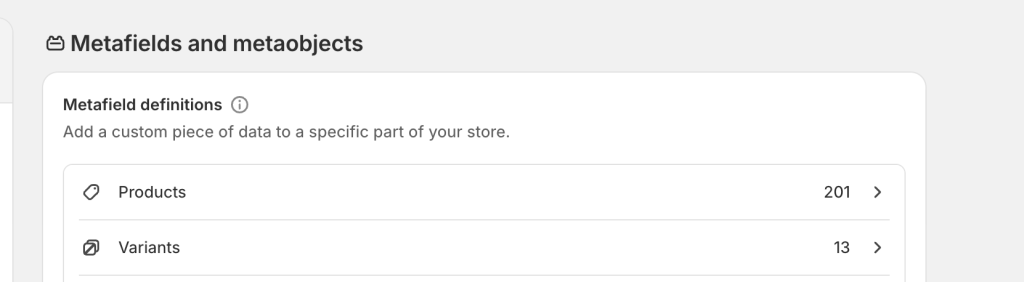
The truth is: a metaobject is a much cleaner way to group these fields into a single “container.”
It keeps your backend organized and makes your Liquid code much easier to read.
3- Specific info impacts many of your products
Ask yourself: “If this information changes next month, do I want to edit 50 products or one central record?”
If your favorite designer changes their headshot or a specific material’s sustainability certification gets updated, you don’t want to be stuck in a “bulk edit” nightmare.
With a Metaobject, you update the central record once, and every product referencing it updates instantly.
It’s the difference between working on your store and working for your store.
Here’s the Bottom Line
Look, I get it, when you first see “Metaobjects” in the Custom Data settings, it sounds like something Sheldon Cooper from The Big Bang Theory TV show would say.
But once it clicks, it really clicks.
Metafields are your go-to for simple, flat, product-specific data. Metaobjects are for when your content has its own life, you know… structured, reusable, and too important to be chained to a single product.
The rule of thumb is simple: the moment you catch yourself copy-pasting the same info across multiple products, or your metafield list starts looking like a CVS receipt, stop.
That’s your sign to reach for a metaobject.
Conclusion
At the end of the day, building a great Shopify store isn’t just about what the customer sees, it’s about what your client has to deal with every single day after you hand it off.
A messy backend is a gift that keeps on taking. Choosing the right data structure from the start is one of those decisions that nobody talks about, but every good Shopify developer quietly gets right.
So the next time you open Custom Data, you won’t freeze up. You’ll know exactly what you’re looking at, and you’ll build it right the first time.
Unlike some of us, who learned the hard way. 😅
Want to see it in action?
If reading about it wasn’t enough and you want to see metaobjects in Shopify come to life visually, this video helped me understand metaobjects a bit more. Think of it as the cherry on top: