
If you’re building a Shopify store, one of the first things you may want to remove is the “Powered by Shopify” text that appears in the footer.
Good news:
Whether you’re using Horizon (Shopify’s AI-powered theme) or a classic theme like Dawn, removing it is quick and easy.
In this guide, I’ll show you two simple methods:
- A no-code, AI method (Horizon theme)
- A manual code method (works on any theme)
No advanced tech skills required.
Why Remove “Powered by Shopify” From Your Footer?
Removing the “Powered by Shopify” tag from your footer is a simple yet high-impact move for any serious e-commerce entrepreneur.
By clearing away this default branding, you instantly elevate your store’s aesthetic, creating a more professional and cohesive brand identity that feels custom-built for your customers.
Beyond just looks, it prevents unnecessary distractions that could lead visitors away from your site, ensuring you maintain complete control over your footer design.
It’s a small, polished detail that builds trust and makes your business feel like a standalone brand rather than just another template.
Removing the “Powered by Shopify” text helps you:
- Look more professional and branded
- Avoid sending visitors away from your store
- Maintain full control over your footer design
It’s a small change that can make your store feel more polished and trustworthy.
Method 1: Remove “Powered by Shopify” Using AI (Horizon Theme)
For those using the Horizon theme, there is a streamlined way to handle this change using Shopify’s built-in AI tool, no manual coding required.
However, it’s important to manage expectations: while this is often the fastest route, the AI can be unpredictable.
Whether your theme has been heavily customized, contains outdated scripts, or has specific code modifications, the AI may occasionally fail to execute the command correctly.
Even on a standard Horizon setup, results can vary, but it is certainly worth trying first for its ease of us.
This is how you may do it:
- Go to Shopify Admin → Online Store → Themes
- Click Edit theme
- Scroll down to the footer
- Activate the Inspector
- Click on the copyright / “Powered by Shopify” text
- Use Sidekick (Shopify AI) and type:
“Remove the powered by Shopify text” - Hit Enter
That’s it.
Shopify’s AI will remove the text automatically for you.
Here’s one of my YouTube Shorts in which I shared how to do it in just a minute:
Method 2: Remove “Powered by Shopify” Using Code (Any Theme)
If you’re not using the Horizon theme or AI fails for you, like it has failed for me 😅, then you may just go into the code and remove the line of liquid that creates the “Powered by Shopify” text.
For example, if you’re on a classic layout like Dawn or one of Shopify’s other popular free templates, this process is nearly universal.
While theme structures can vary slightly, the underlying logic remains the same across the entire Shopify ecosystem.
You don’t need to be a developer to get that high-end, custom look; you just need to know which toggle to flip or which line to look for.
This is how to do it through code
1. Go to Shopify Admin → Online Store → Themes
2. Click the three dots (⋯) next to your theme
3. Select Edit code
4. Open the Sections folder and look for a file called “footer.liquid”:
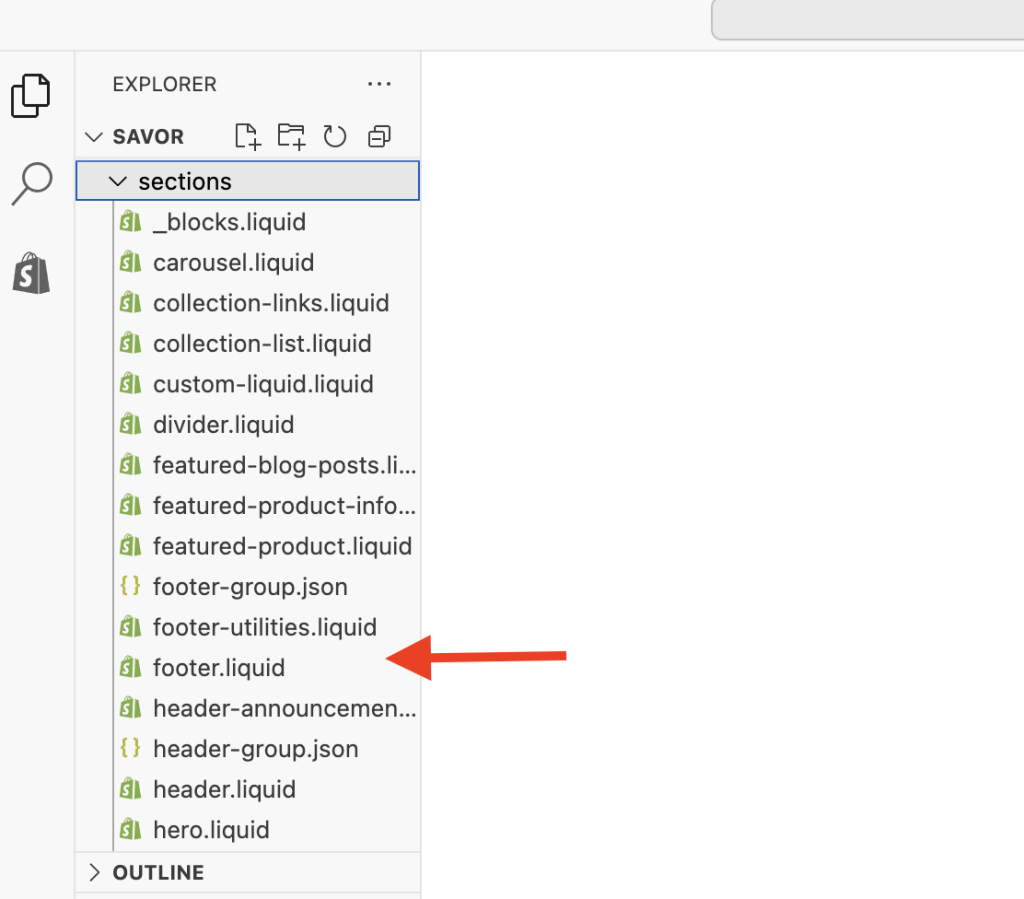
While “footer.liquid” is the standard location for modern Shopify themes, the “Powered by Shopify” link isn’t strictly there for all themes.
It’ll always depend on the theme’s architecture, so if you don’t see it in the main footer section, it is likely into files like:
- layout/theme.liquid: Common in older “vintage” themes where the footer was part of the global layout rather than a modular section.
- The snippets folder: Some themes use snippets like footer-copy.liquid or social-links.liquid to keep the main footer file less cluttered.
- sections/footer-group: In some newer Online Store 2.0 themes, the footer is part of a “section group,” which might reference a specific sub-section file.
5. Click on footer.liquid
And while the file is open, Cmd + F (Mac) or Ctrl + F (Windows).
This will prompt the search bar in which you need to type “powered_by_link” (including the underscores).
This will take you to the exact line of code that you need to delete.
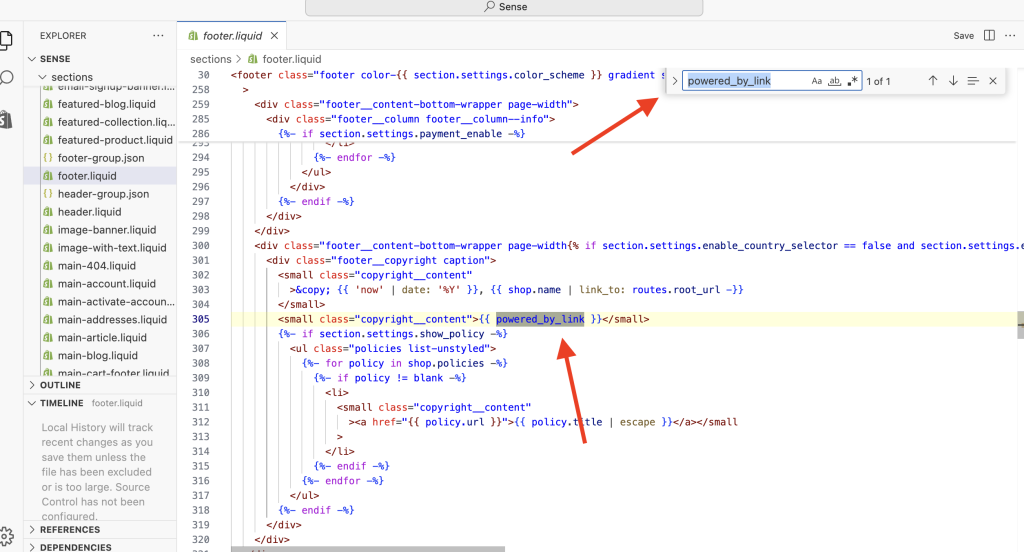
Instead of deleting the line, you can “comment it out” by wrapping it in {% comment %} and {% endcomment %} tags.
This way, if you ever change your mind, you don’t have to remember the exact syntax to bring it back, you’ll just need to delete those comment tags.
6- Delete or comment that entire line of code
7- Click Save
8- Refresh your store
The Powered by Shopify text will be gone!
Here’s another one of my YouTube Shorts in which I shared how to do it quickly:
Will Removing “powered by shopify” Impact My SEO?
The short answer is: not at all!
You can breathe easy knowing that removing the “Powered by Shopify” link won’t hurt your search engine rankings or make Google grumpy.
Search engines focus on things that actually affect user experience, like how fast your pages load, how helpful your content is, and whether your site is easy to use on a phone.
From a technical standpoint, it’s just one less external link on your page, which is perfectly fine for your SEO health!
Final Thoughts
Removing the “Powered by Shopify” text is a quick win that instantly makes your store look more professional.
Whether you prefer AI tools or simple code edits, you now have both options.
If you found this helpful, consider subscribing to my YouTube channel, I regularly share quick Shopify fixes, simple customizations, and conversion-focused tips for store owners